Language Learning App
Interaction Design & UX Strategy
Glossa is a language-learning app concept that combines music, TV series and podcasts to help French users learn English through real-life content. A Thai version is explored in section 12.
- Problem: French adults learning English struggle most with grammar, speaking and pronunciation.
- My role: Solo UX researcher and UX/UI designer: literature review, survey (36 respondents), analysis of 6 apps, 4 personas, Figma prototype and usability tests.
- Tools: Google Forms, Figma, Zoom.
- Outcome: The survey changed my idea: 71% preferred TV series over music, so Glossa combines music, series and podcasts.
PRODUCT PITCH
This video presents Glossa’s concept, its key features, and how it aims to make language learning more engaging through music, series, and podcasts.
RESEARCH
01 PROJECT OVERVIEW
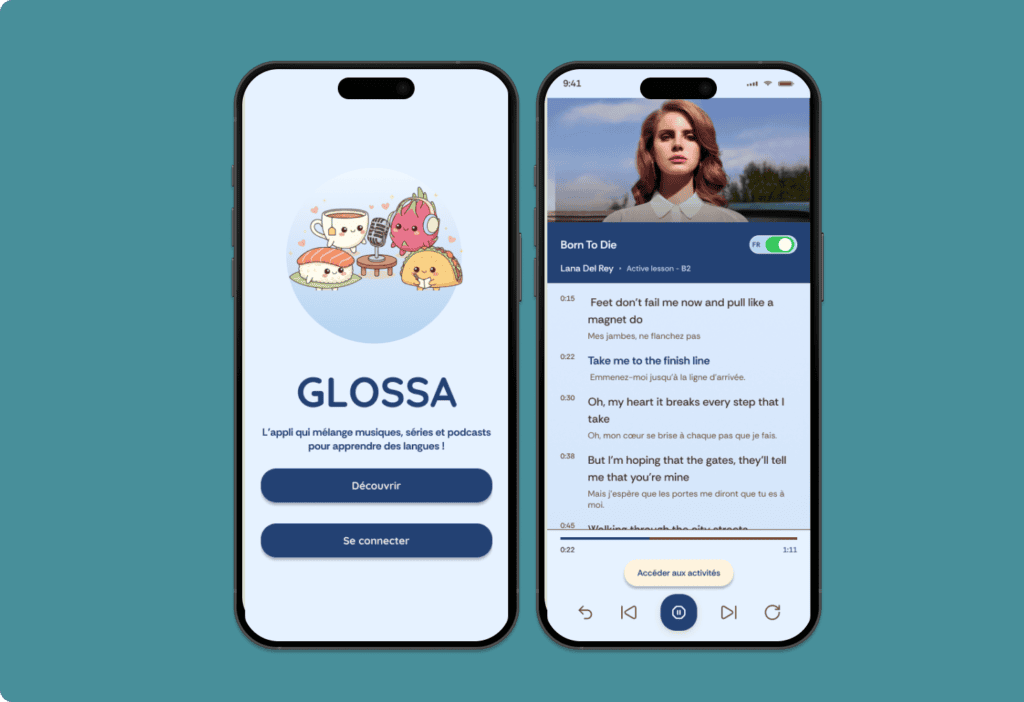
Glossa is a language-learning app concept designed for French speakers learning English. It combines music, TV series and podcasts to help learners improve their language skills through authentic content.
Research suggests that music can support language learning by improving listening skills, helping learners remember vocabulary and exposing them to pronunciation patterns.
However, music also has limitations. Songs can contain poetic or colloquial language that may not always be useful in everyday situations. By combining music, TV series and podcasts, Glossa offers a wider range of contexts, accents and language examples.
The project explores a more engaging and flexible way to learn English through authentic media and interactive exercises.

02 GOALS
Here are my four goals:
Make language learning more engaging by combining music, TV series, and podcasts.
Connect learning with real-life situations through diverse accents, colloquial expressions, and authentic content.
Address learners’ difficulties with grammar, speaking, pronunciation, and listening through interactive exercises.
Offer a flexible learning experience with guided learning paths and an exploratory mode, allowing users to learn at their own pace and according to their interests.
03 METHODOLOGY
Here is my iterative process from research to testing:

04 LITERATURE REVIEW
To understand how music can support language learning, I reviewed research on its cognitive, pedagogical, and emotional benefits.
The studies highlighted several potential benefits:
Vocabulary retention: Repetition can help learners remember words and expressions.
Listening and pronunciation: Songs expose learners to different sounds, rhythms, connected speech, and pronunciation patterns.
Authentic language: Lyrics can introduce colloquial expressions, idioms, and cultural references.
Motivation: Music can make learning more enjoyable by engaging learners emotionally.
However, songs also have limitations. Their vocabulary and expressions may be poetic or informal, and they do not always reflect the language used in everyday situations.
These findings helped shape Glossa’s concept. Rather than focusing on music alone, I chose to combine music, TV series, and podcasts to expose learners to a wider range of accents, expressions, and real-life language contexts.
05 SURVEY
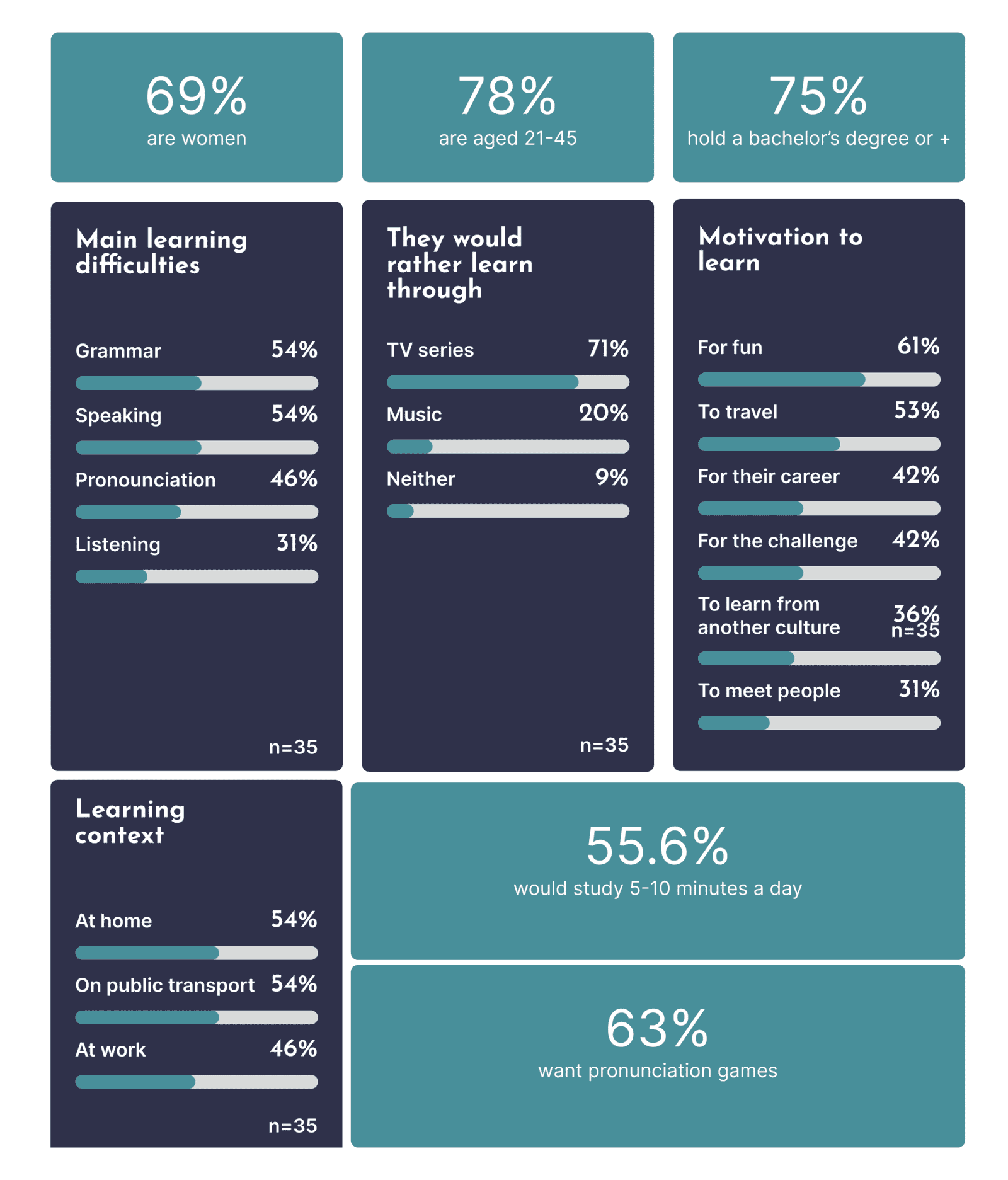
To understand learners’ habits and expectations, I ran an online survey (36 respondents; 35 answered the questions on difficulties and preferences).
Key insight: The findings challenged my assumption that music alone would appeal, and led me to combine music, series and podcasts with short, flexible lessons.
06 APP ANALYSIS
I analysed six language-learning applications to explore how they use authentic content, structure exercises, and support learners.
Applications analysed: LingoClip, LyricFluent, Sounter, Canary, Language Reactor and Lingopie.
Key findings
Context matters: Learners need to understand expressions in context, not just memorise isolated words.
Flexibility supports learning: Playback controls, repetition, and translation options help learners work at their own pace.
Exercises need variety: Repetitive quizzes and reward systems alone offer limited opportunities to practise and reuse new language.
Clarity is essential: Complex onboarding, cluttered layouts, and unclear controls can make learning more difficult.
These findings informed Glossa’s approach: combining authentic media, contextual vocabulary, varied exercises and flexible learning paths.
07 PERSONAS, JTBD & HMW
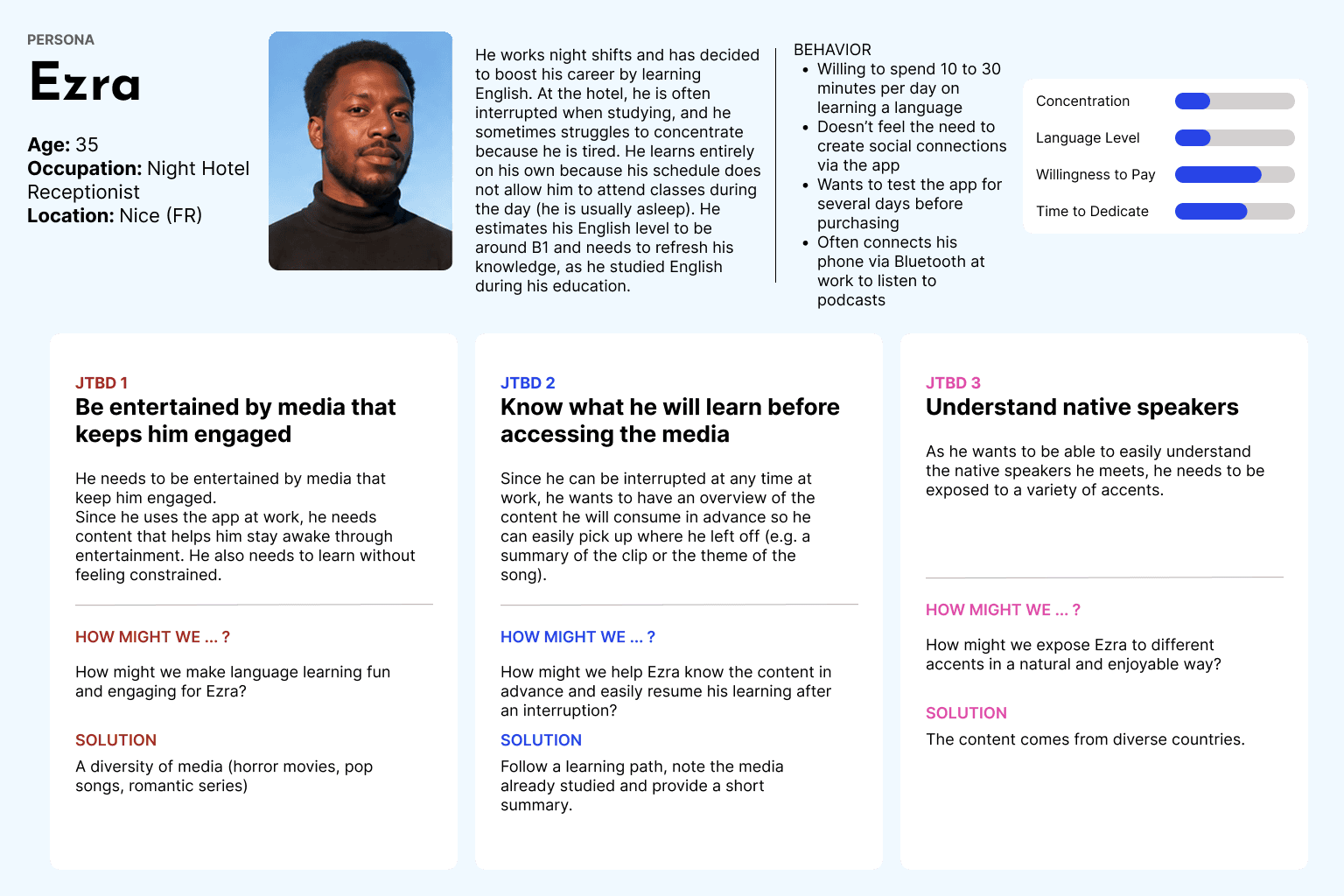
I created four personas to represent different learning goals, habits, and challenges. I then used Jobs to Be Done (JTBD) and How Might We (HMW) questions to translate their needs into design opportunities.
The research highlighted several priorities:
Learn flexibly: Make it easy to start, pause, and resume lessons.
Learn in context: Combine different types of content, accents, and everyday expressions.
Remember and practise: Offer vocabulary lists, memory exercises, grammar support, and pronunciation practice.
Stay motivated: Provide guided learning paths and engaging exercises without creating unnecessary pressure.
These insights helped me prioritise Glossa’s features and shape a learning experience that adapts to different needs and routines.
08 MoSCoW method
I used the MoSCoW method to prioritise features according to users’ needs and the project’s scope.
The priorities included:
Must have: Music, TV series and podcasts, short and long exercises, progress tracking, vocabulary lists, grammar support, and pronunciation practice.
Should have: Guided learning paths, content summaries, varied accents, offline access, and gamification.
Could have: Community features, chat, and additional ways to interact with content.
Won’t have for now: Too many notifications and timed exercises.
This prioritisation helped define a clear scope for the prototype while keeping the main learning needs at the centre of the experience.
DESIGN
09 LEARNING PATHS
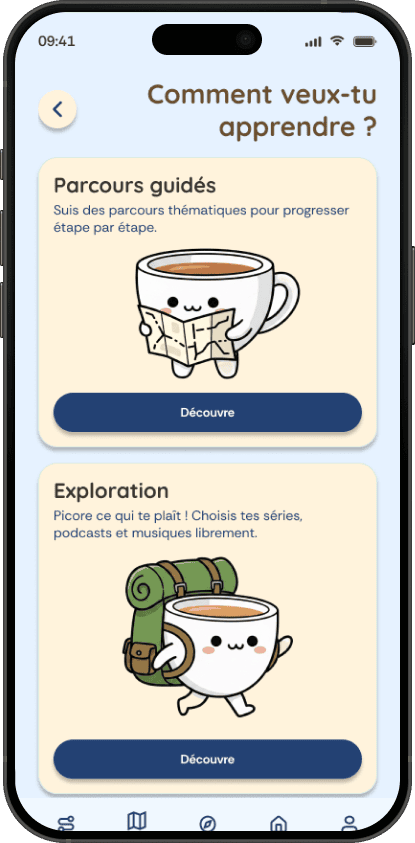
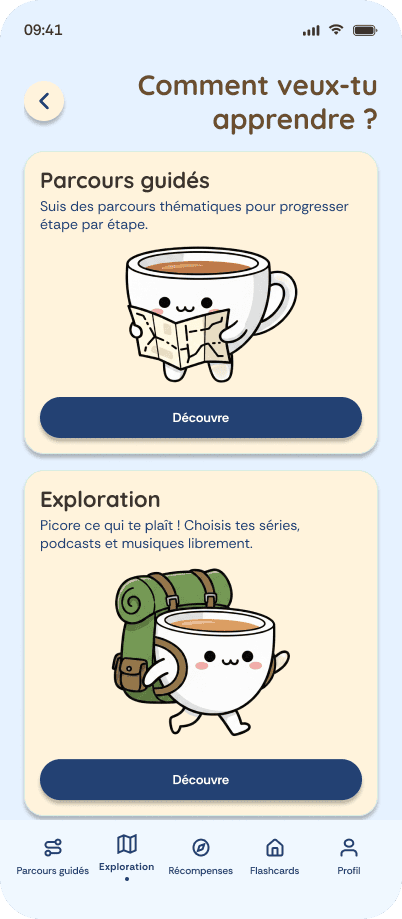
Glossa offers two ways to learn:
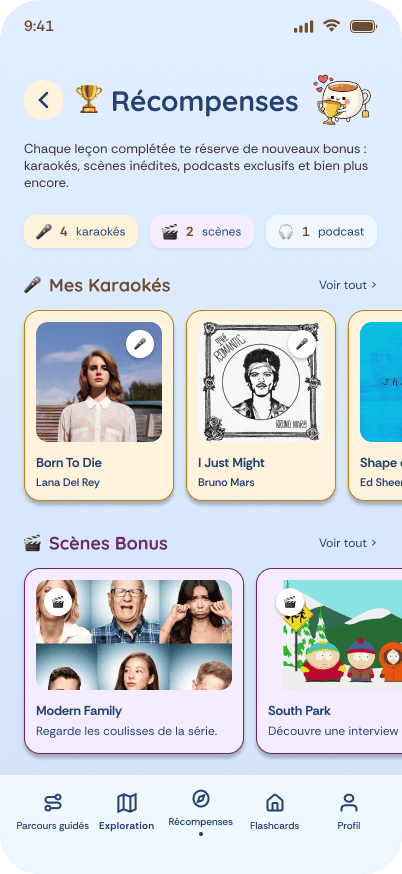
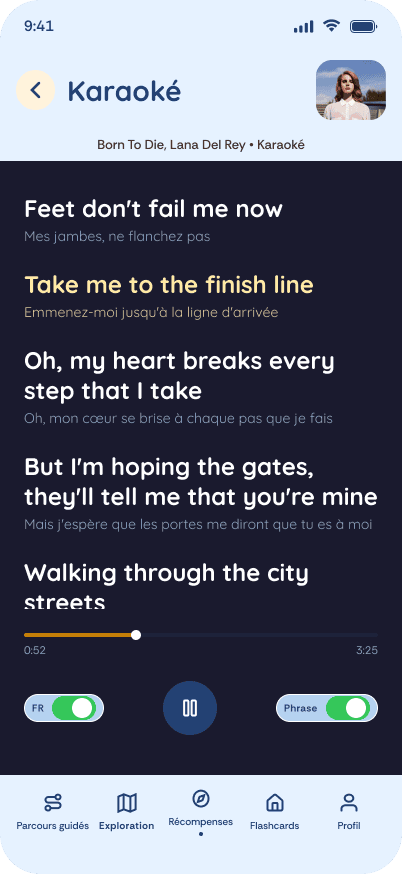
Guided learning paths: Lessons are organised by level and theme, helping users progress through structured learning activities. Completing lessons unlocks surprises, such as karaoke sessions and behind-the-scenes content.
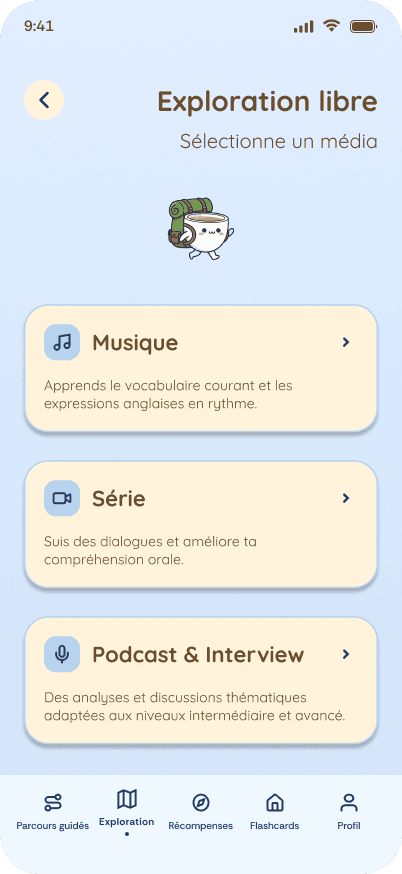
Free exploration: Users can discover music, TV series, and podcasts based on their interests and learn through media they enjoy.
This structure combines guided progression with the freedom to explore, allowing users to choose how they want to learn.
10 FROM RESEARCH TO DESIGN DECISIONS
A mix of media: 71.4% preferred TV series over music (20%). I expanded Glossa to include TV series, music and podcasts.
Targeted practice: Grammar and speaking were the most reported difficulties (54.3% each). I included grammar resources and pronunciation exercises.
Short learning sessions: 55.6% spent 5–10 minutes a day learning. I designed short lessons and flexible learning paths.
Motivation: 61.1% learned for pleasure and 52.8% for travel. This informed Glossa’s playful visual identity, mascot and rewards.
Affordability: 88.6% would pay less than €9 per month. This informed the subscription pricing considerations.
- In an interactive prototype, I translated research findings, feature priorities and user flows into an interactive Figma prototype. I used Figma AI to support wireframing and design reviews, then refined the screens and flows manually.
- A softer visual identity: The initial direction felt too futuristic. I developed a calmer visual identity inspired by Spotify, while creating a distinct look for Glossa.
- Two ways to learn: I designed guided learning paths organised by level and theme, alongside free exploration of music, TV series and podcasts. Lessons include interactive exercises and rewards, with bonus content unlocked by scores above 80%.
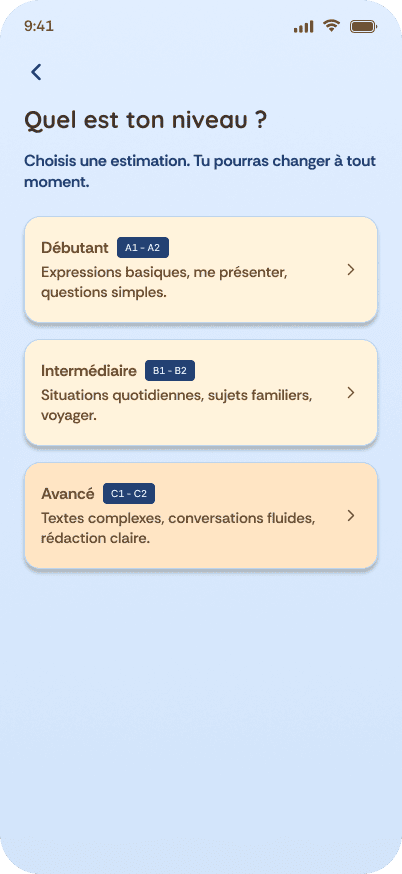
A. Onboarding & Personalisation
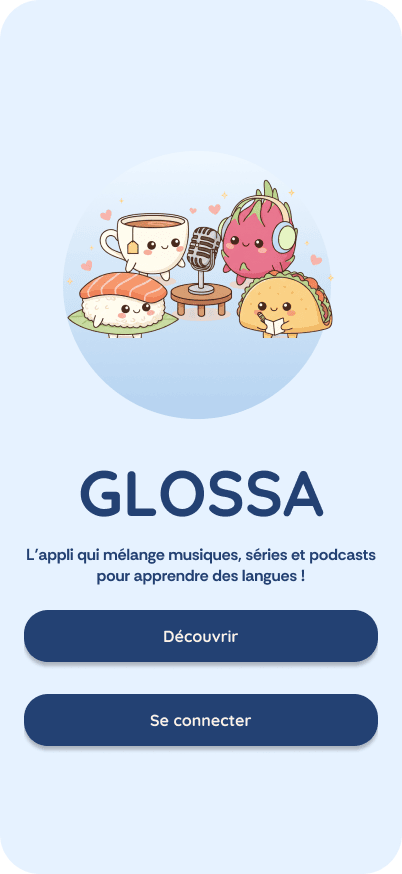
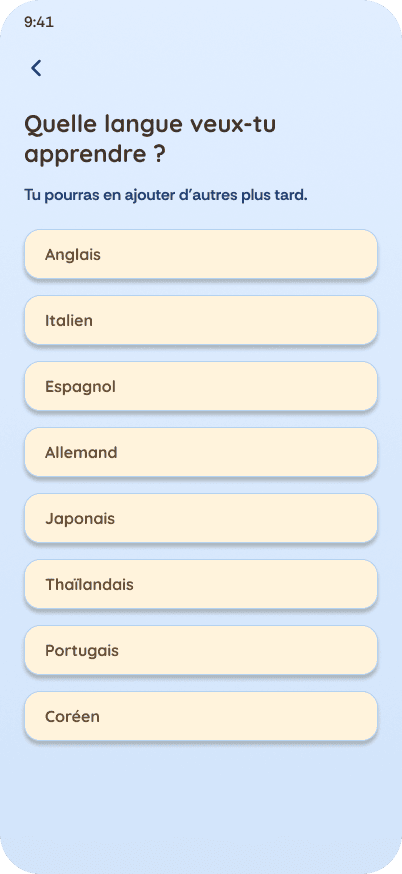
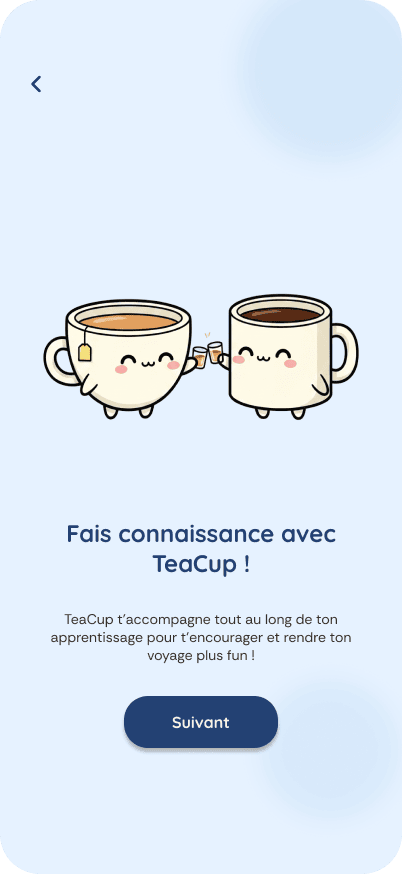
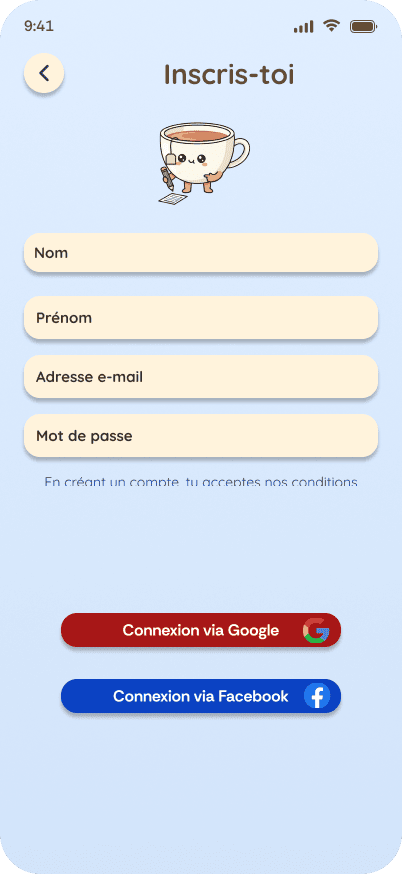
The onboarding introduces users to Glossa and its mascot, TeaCup, before guiding them through the initial setup. Users can choose a language to learn, create an account, select their learning goals, and assess their current level. This helps personalise the learning experience from the start.

B. Modes
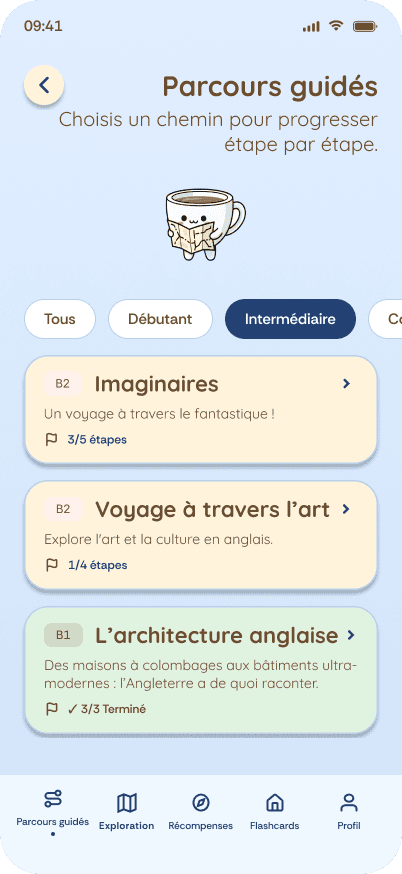
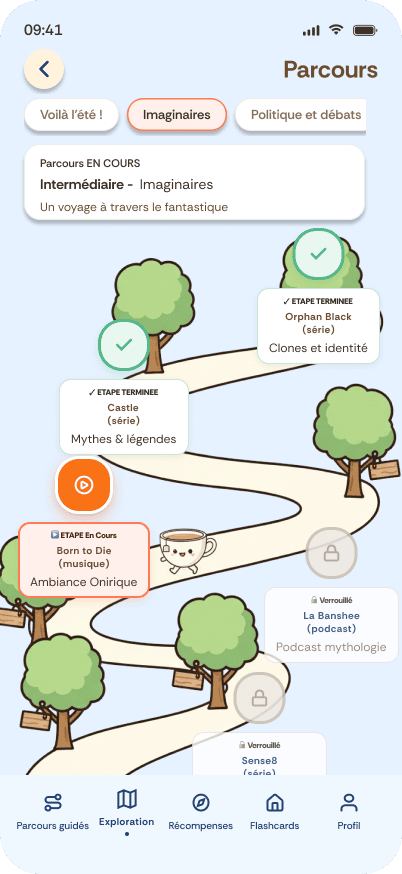
Guided Learning Paths
Users can follow themed learning paths that combine songs, series, and podcasts. Each path is organised by language level, from beginner to fluent, and guides users from one lesson to the next. This structure provides a clear direction for learners who prefer a more organised approach.
Exploratory Mode
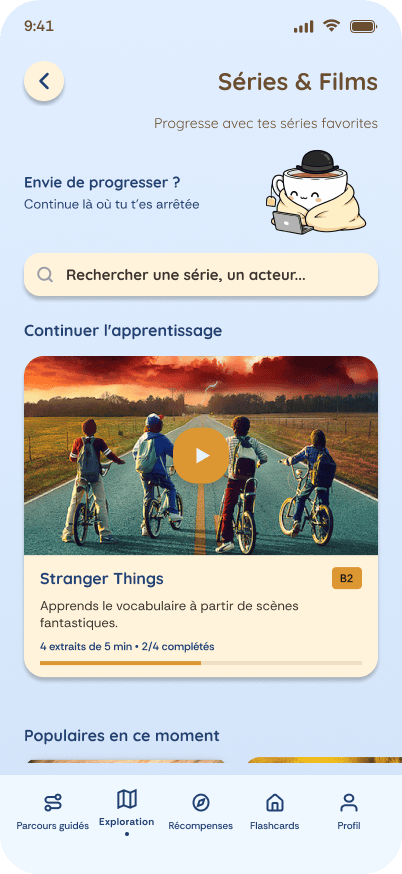
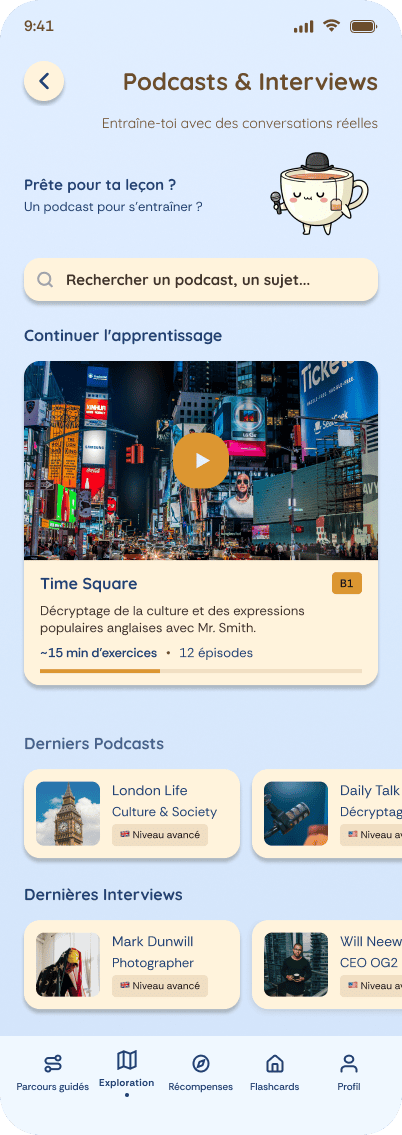
Users can browse content freely by selecting a media type, searching for specific content, or exploring recommendations. Unlike guided paths, this mode brings together different language levels, allowing users to follow their interests and discover content without committing to a predefined learning sequence.
C. Media
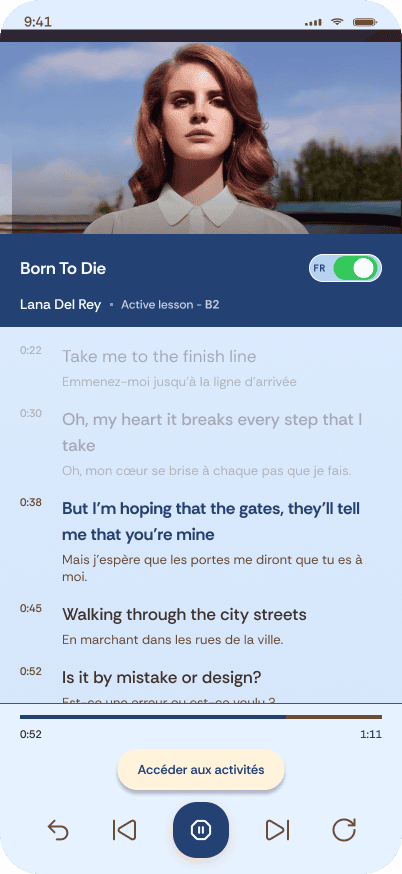
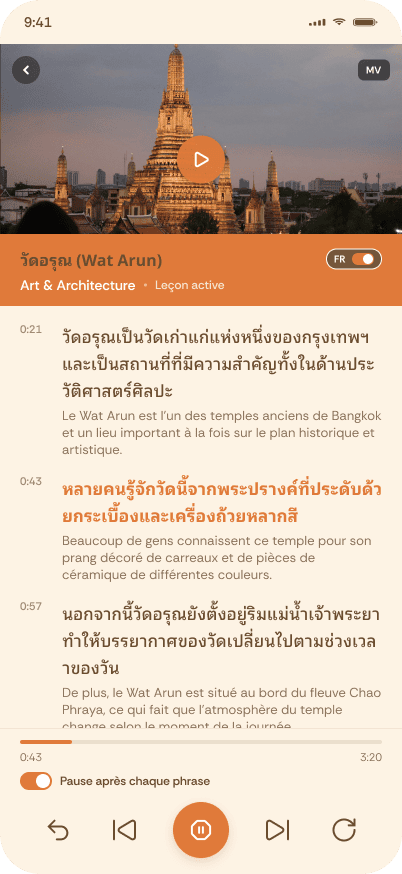
Users can explore songs, series, and podcasts through synchronised lyrics or dialogue. They can switch French translations on or off, access vocabulary and grammar lists, and resume a lesson where they left off. This allows them to learn at their own pace, even when their sessions are interrupted.
When selecting an ongoing or upcoming lesson in a guided path, users can view on a modal a summary of its content, level, and key vocabulary before starting.
In learning mode, users can click on any word to see on a modal its part of speech, how it is used in the current context, and an example of its use in another context.

D. Activities
Each lesson provides vocabulary and grammar resources based on the content. Words are prioritised by how frequently they are used in everyday situations, helping learners focus on the most useful expressions.
Users receive immediate feedback after each answer, allowing them to identify mistakes and understand how to improve.
Users can revisit words they have encountered throughout the lessons using flashcards. This helps them review vocabulary and strengthen their memory over time.


E. Exercises
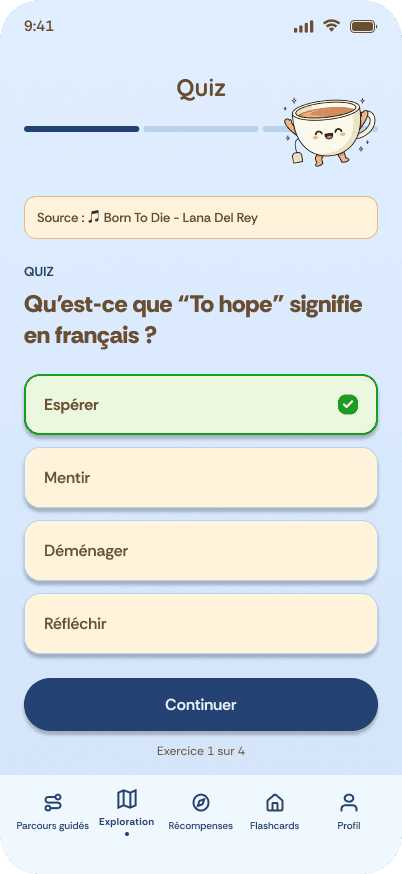
- Quizzes: Quizzes help users test their knowledge after learning new vocabulary and grammar. They provide an opportunity to review what they have learned before moving on.
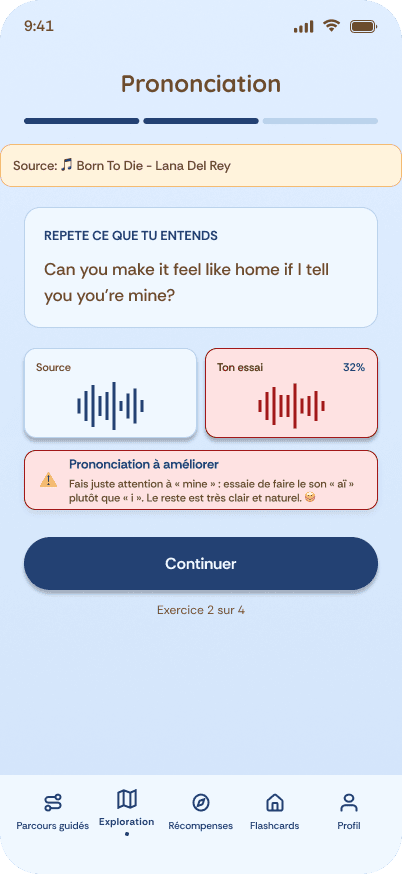
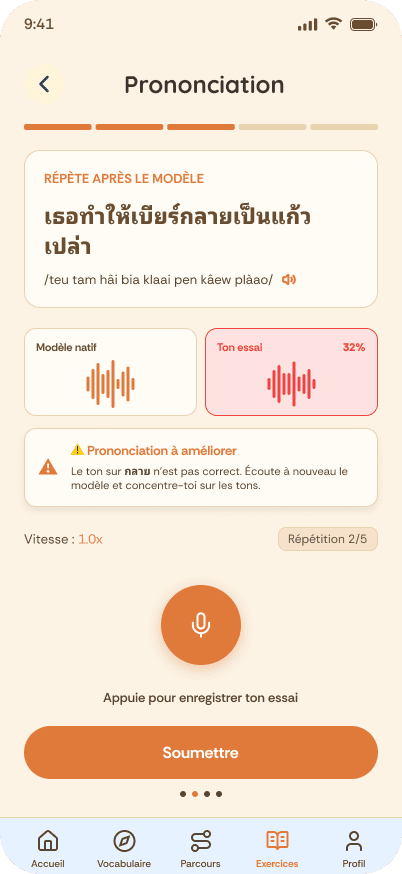
- Pronunciation: Users can record themselves by pressing the microphone button. This exercise allows them to practise pronunciation, one of the difficulties highlighted in the survey.
- Listening comprehension: Users listen to short excerpts and identify the words they hear. Additional information about the song or artist provides cultural context and encourages further discovery.
- Memory cards: Memory cards help users review vocabulary and strengthen their ability to recall previously learned words.
- True or false: These questions go beyond simple word recognition, helping users check their understanding of the content.
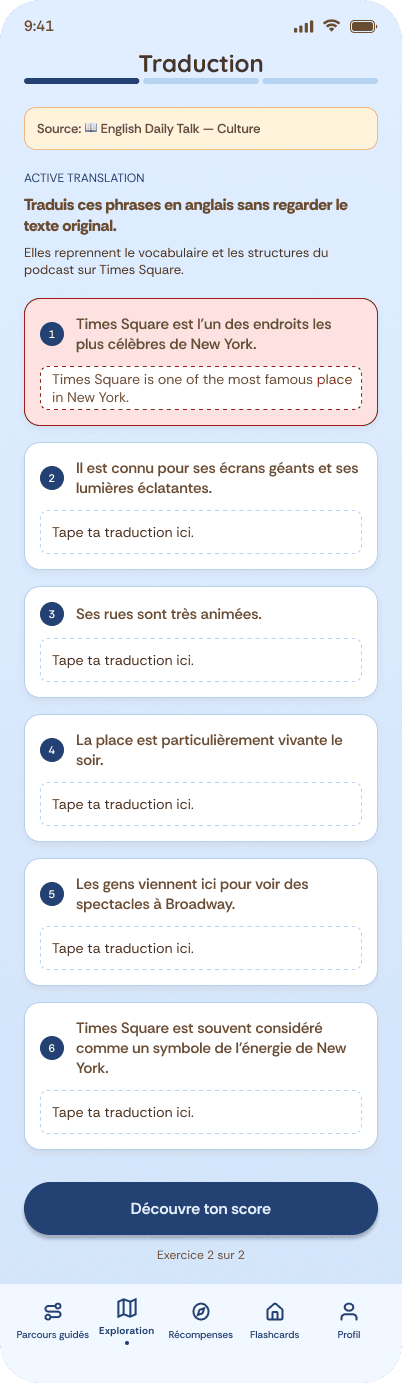
- Translation: Translation exercises gradually increase in difficulty, allowing users to practise applying their knowledge and progress step by step.
- Reading comprehension: Drag-and-drop activities invite users to reconstruct a text, helping them practise reading comprehension in an interactive way.

F. Success & Rewards
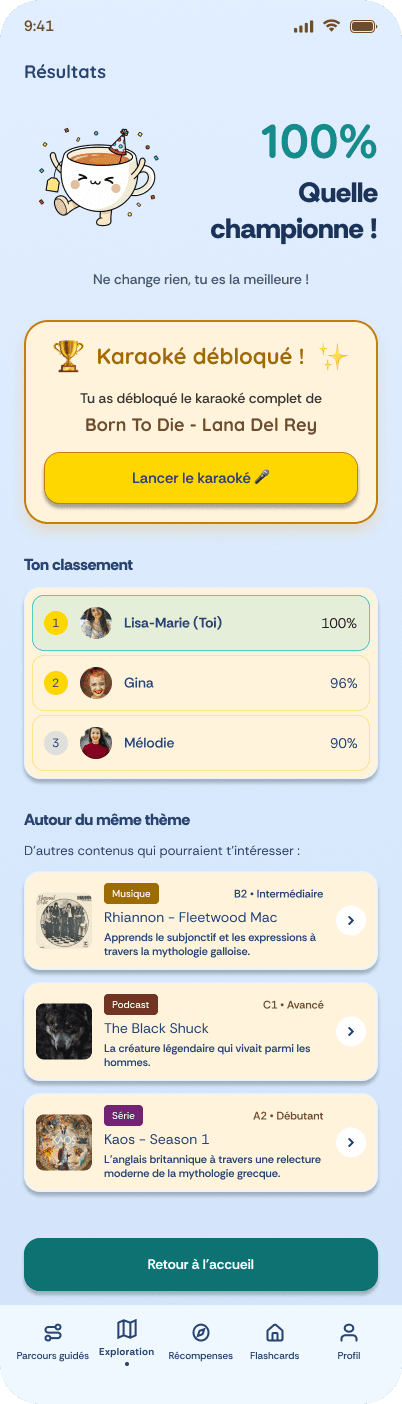
The teacup mascot and encouraging messages celebrate users’ achievements and encourage them to keep learning. Users can also compare their scores with friends, adding a social dimension to the experience.
Users who achieve a score above 80% at the end of a lesson can unlock bonus content, such as karaoke and behind-the-scenes videos, giving them more opportunities to practise and explore.
For users following a guided path, completing a lesson leads to the next step, allowing them to continue learning without having to choose what to study next.
G. Profile & Payment
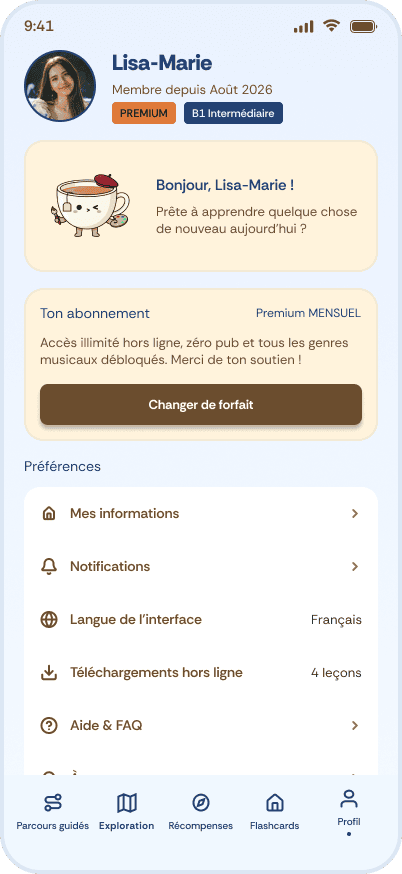
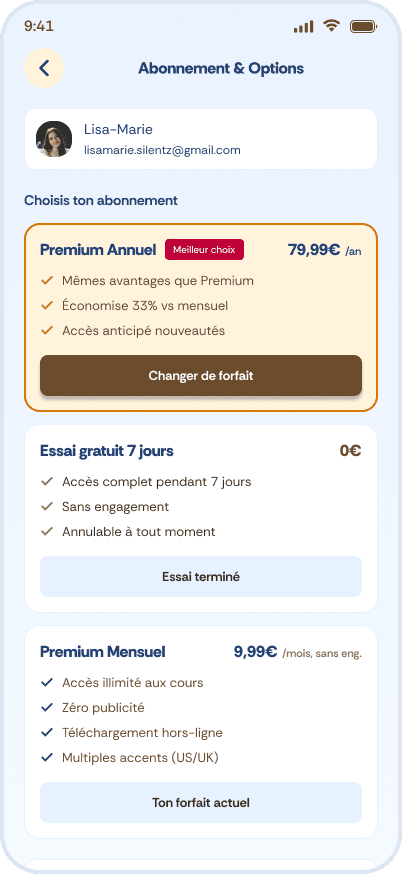
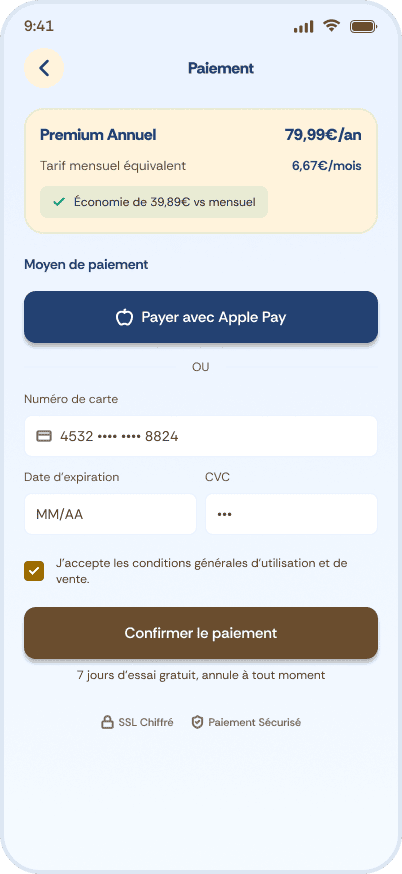
From their profile, users can access their subscription options and choose to change their plan. The interface guides them through the available steps.
After selecting a new plan, users can review their choice, confirm the payment, and view a confirmation screen once the process is complete. The monthly price is aligned with the survey respondents’ choice.
REVIEW & NEXT STEPS
11 USABILITY TESTING
Testing the experience
I tested parts of the prototype with four users through task-based sessions on Zoom, using mobile screen sharing. I observed task completion, ease of use, navigation, and pain points, and collected qualitative feedback.
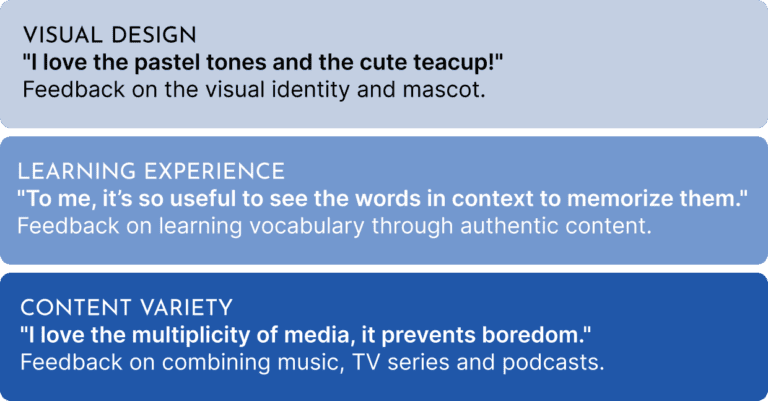
The four testers appreciated the concept, the exercises, and the overall design. They also understood the different learning paths intuitively.
Turning feedback into improvements
Testing helped me refine wording and micro-interactions, clarify the interface, and make navigation smoother.
In the final version, task completion reached 100% across the tested tasks. However, the “translation FR” toggle still needed clearer guidance, even though two testers appreciated having this option.
Learning to handle critical feedback
Receiving feedback from one of the testers was emotionally difficult, especially when each screen was closely scrutinised and accompanied by prescriptive recommendations. However, this experience pushed me to reflect on how feedback is collected and interpreted.
I learned to distinguish between genuine usability issues, valuable suggestions, and personal preferences, such as opinions about the layout or the mascot. This helped me enrich the content and clarify the experience while taking a more thoughtful approach to design decisions.
12 FUTURE DIRECTION: THE THAI VERSION
The original vision
Glossa was initially conceived as an app for French speakers learning Thai, inspired by my own experience of learning the language. I chose English for the main project because it was easier to reach relevant survey participants.
Adapting the visual identity
For the Thai version, I replaced the little teacup mascot with a dragon fruit. This change was part of the visual direction explored for this version.
Addressing Thai learners’ needs
My research identified a gap in French-language resources for learning Thai. Some existing apps focus mainly on the alphabet, while others offer poor translations.
Rather than relying on isolated vocabulary, I wanted to retain Glossa’s media-based approach, using music, TV series, and podcasts to provide language in context. Since Thai is a tonal language, pronunciation would also be a key learning priority.
Challenges and opportunities
Developing this version would require collaboration with Thai-language experts to ensure linguistic and cultural accuracy. Securing the rights to use music, TV series, and podcasts would also be a major challenge.

13 WHAT I LEARNED
- Question my ideas. I thought music would be the main hook. But 71% of people in my survey preferred TV series. So I added series and podcasts.
- Use AI where it helps. I used Figma AI for first-draft wireframes, then redesigned the screens, flows and interface myself.
- Turn feedback into priorities. After testing with four users, I sorted their comments by type. For example, the French translation toggle needed clearer guidance, so I listed it as a usability problem.
- Know when to stop. It is always tempting to add one more screen or feature. I learned to set limits and keep to them.
- Design from experience. I am learning Thai at a language school in France and with a private Thai teacher. I am at A2. This showed me what French speakers often miss when they learn Thai. It is why a Thai version of Glossa is my long-term goal.
14 NEXT STEPS
Short-term improvements (2–3 months)
Expand the content library: Add more exercises and media by obtaining the necessary content rights.
Ensure content quality: Have teachers review AI-generated exercises.
Introduce AI conversations: Offer simulated debates as rewards for completing podcast lessons.
Development (4–6 months)
Work closely with developers and conduct further usability testing before launching Glossa. The current prototype provides a foundation for development, but further implementation and validation are needed.
Long-term opportunities (1 year+)
Build a social learning experience: Strengthen the community dimension through group challenges, duels, chats, and video discussions.
Explore additional languages: English, Spanish, German, and Italian were frequently mentioned by respondents as languages they were learning or planned to learn. Korean and Thai also represent interesting opportunities for Glossa.
The rights for music, series and podcasts: Music licensing alone could cost around $10,000–$50,000 or more per year for a small app, based on one industry estimate. Series and podcasts would add further costs. To reduce costs, a first version could use embedded YouTube content, partner with independent artists, or use Creative Commons content before negotiating larger licences.
Credits. First drafts of the screens were made with Figma AI, then redesigned by me. The mascots, the hero image and the illustrations on this page were generated with AI tools. Research, flows, design decisions and testing are my own. Song, series and artist names and images are used for illustration only.
I’m travelling in Southeast Asia from December 2026 and looking for a UX/UI or UX research role in the region.
Let’s grab a coffee!
Or write to marion.hulot@gmail.com